


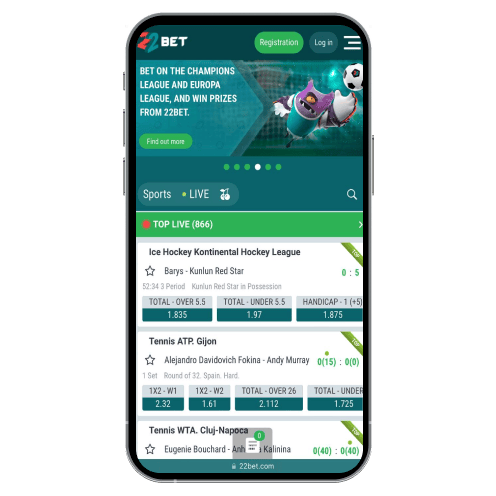


What’s the 22Bet App?
The 22Bet app feels like carrying the full betting site in your pocket. You can bet on sports, play slots, try out live dealer games, or even do quick deposits and withdrawals from your phone. It’s available for Android and iOS, which is a big plus, and it works well with UGX (Ugandan Shillings), so no weird currency conversions.
What we liked: It’s fast and doesn’t take up much storage space. What we didn’t like: The 22Bet Android setup is a bit of a process (we’ll explain later).
Using the App on iOS
If you’re an iPhone user, you’re in luck; downloading the app is super simple. Our older iPhone SE worked smoothly with no lag or crashes; even live betting and casino games ran fine.
How to Download and Install the 22Bet App on iOS
Here’s how we got the app:
- Open Safari on your phone.
- Go to the 22Bet website (don’t look for it in the App Store — go straight to the site).
- Scroll to the bottom and tap on “Mobile Applications.”
- Choose the 22Bet iOS version, which redirects you to the App Store.
- Tap “22Bet Download,” and the app installs like any other.
It’s that easy. It was up and running in under 5 minutes. You don’t need to tweak any settings or deal with weird permissions — it’s all smooth.
System Requirements for iOS
The app works on iOS 11 or later, so you’re good unless you’re using a phone from 2014. We tested it on an iPhone SE and a newer iPhone 12—it ran perfectly on both.
Does It Work on iPads?
Yes, we tried it on an iPad Air, too. The app adjusts nicely to the bigger screen and is excellent for live casino games. If you want a more immersive experience, an iPad works really well.
Using the App on Android
Now, Android users have a bit more work to do. The 22Bet app isn’t on the Google Play Store (Google doesn’t allow gambling apps there), so you’ll have to download it directly from the 22Bet website. It’s just like the iOS version, but some extra steps are involved.
How to Download and Install the 22Bet Apk on Android
Here’s exactly what I did to get the app on my Samsung Galaxy A12:
- Open Chrome on your phone and go to the 22Bet website.
- Scroll to the bottom of the page and tap “Mobile Applications.”
- Choose the Android version, and the apk file will start downloading.
- Go to your phone’s Settings and allow “Install apps from unknown sources.” (Don’t worry; the file is safe. We checked before installing it.)
- Once that’s done, open the apk file, and it’ll install the app.
- It took about 10 minutes to complete. The only tricky part was the permissions step, but the app worked just fine once we completed it.
System Requirements for Android
The app runs on Android 7.0 or higher (most phones from the last five years should work fine). We tested it on newer devices like the Samsung Galaxy A14, Tecno Camon 20 Pro, and a Redmi Note 12, and it ran smoothly without any issues.
Compatible Devices
We tested the app on a Samsung Galaxy A12, which worked perfectly. Whether you’re using a budget phone or a newer mid-range device, you should have no problems running the app. If your phone is from 2018 or newer, you’re probably good to go!
What If You Don’t Want to Download 22Bet App?
If downloading apps isn’t your thing, you can still use the 22Bet mobile website. We used it before we downloaded the app, and honestly, it’s almost the same experience. You can place bets, play casino games, and even deposit or withdraw.
The only downside? You’ll need to log in every time, which can get annoying. The app is just more convenient overall.
Our Experience Betting on the App
Betting on the app is easy. We placed a bet on Arsenal vs. Chelsea in the Premier League, and it took less than a minute. The odds are updated in real-time, and we liked how fast the live betting section loaded.
For Ugandan players, they’ve got local leagues like the Uganda Premier League, which is great if you’re into local football. If that’s your thing, they also have markets for bigger leagues like La Liga, Serie A, and even esports.
Playing Casino Games on the 22Bet App
We spent about an hour in the casino section, and it’s packed with options. Here’s what we tried:
- Book of Ra: The slot loaded quickly, and the controls were super simple.
- Rich Piggies 2: The animations ran smoothly, and the app didn’t heat up the phone.
- Live Blackjack: We joined a live table, and the video stream was super clear. Just make sure your Wi-Fi is strong, or it might lag.
- They’ve also got games like Plinko, Dice, and HiLo if you’re into quick, simple games.
Conclusion
If you’re serious about betting, app 22Bet is a solid choice. It’s fast, works well on both Android and iOS and gives you access to everything from sports betting to casino games.
For iOS users, the download process is simple. It’s a bit more work for Android users, but it’s worth it once it’s set up. I’d recommend it to anyone in Uganda who wants a reliable way to bet on the go.
Registration